Initialize Module Project
Overview
Module template is used to develop reusable application modules or independent services. Modules are sub-applications consumed by your main project, and using them is a best practice for microservice solutions.
Key Capabilities
- Reusable application modules
- DDD-layered architecture
- Multiple frontend support (MVC, Angular, Blazor)
- Multiple database providers (EF Core, MongoDB)
- Built-in test infrastructure
- NuGet packaging support
Prerequisites
- ABP CLI installed
- .NET 9.0+ SDK
- Visual Studio 2022+
- NuGet package manager
Quick Start
Option 1: Using ABP CLI
The abp new command creates an ABP solution based on a template.
Available Frontends: MVC, Angular, Blazor
Available Database Providers: Entity Framework Core, MongoDB
abp new-module GridLab.Gmss.ModuleName -u mvc -d ef
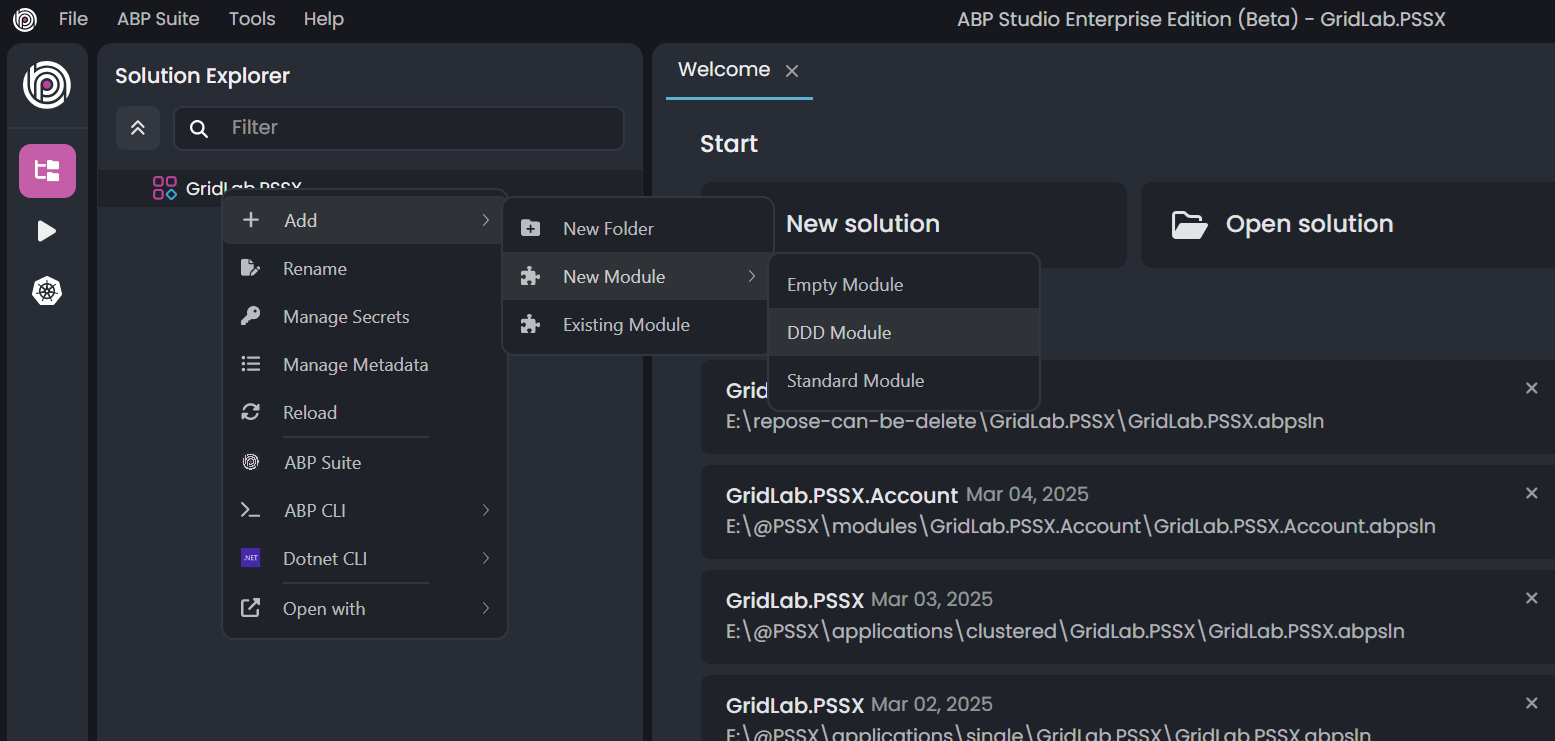
Option 2: Using ABP Studio
ABP Studio provides a visual interface for module creation. An active internet connection is required for first access.
Solution Structure
Based on your selected options, the generated solution follows this structure:
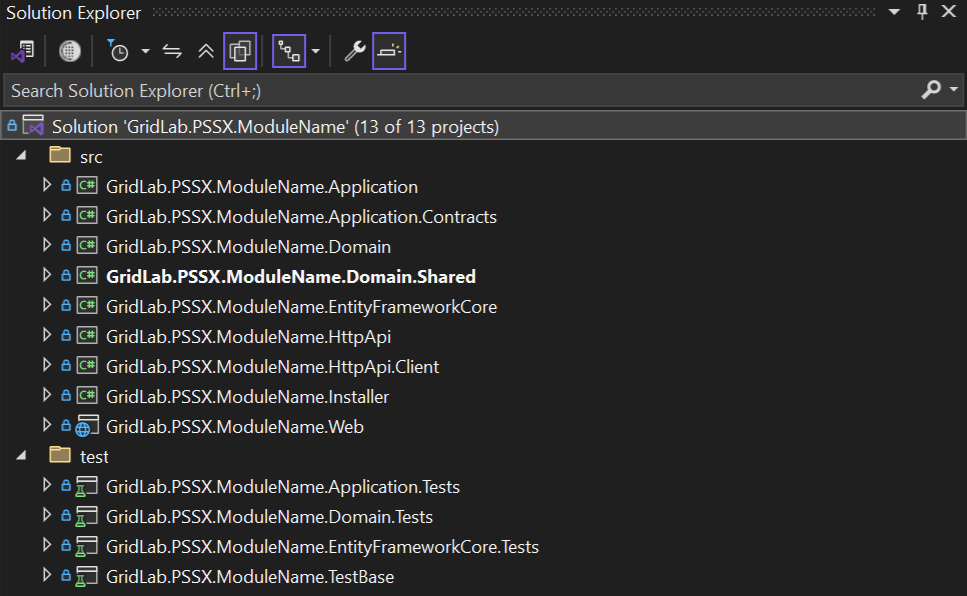
Folder Organization
| Folder | Purpose |
|---|---|
src/ | Module source code, layered per DDD principles |
test/ | Unit and integration tests |
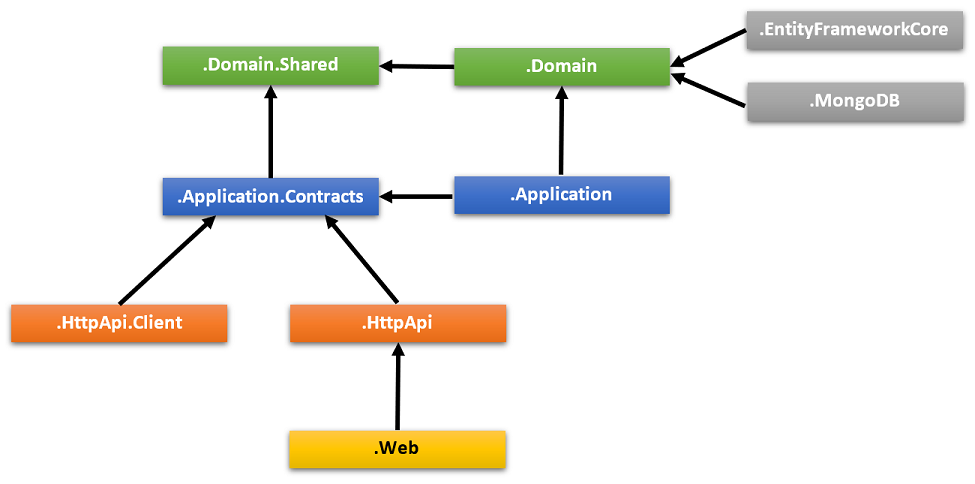
Project Dependency Diagram
Test Projects
The solution includes dedicated test projects for each layer:
| Test Project | Tests | Description |
|---|---|---|
.Domain.Tests | Domain layer | Entities, value objects, domain services |
.Application.Tests | Application layer | Application services, DTOs |
.EntityFrameworkCore.Tests | EF Core | Custom repositories, DB configuration |
.MongoDB.Tests | MongoDB | Custom repositories, DB configuration |
.TestBase | Shared | Base classes and utilities for all tests |
.HttpApi.Client.ConsoleTestApp | HTTP APIs | Console app demonstrating API usage from .NET |
Test Infrastructure Features
- Fully integrated with ABP Framework and all application services
- SQLite in-memory database for EF Core tests
- Mongo2Go library for MongoDB tests (Mongo2Go)
- Authorization disabled for easy service testing
- Integration-first approach for comprehensive coverage
💡 Tip: You can still create unit tests with mock/fake objects for faster execution, though they require more setup effort.
⚠️ Note: Domain & Application tests use EF Core by default. If you remove EF Core or prefer MongoDB for these layers, manually update project references and module dependencies.
NuGet Configuration
NuGet behavior is controlled by settings in NuGet.Config or nuget.config files. See Common NuGet Configurations for details.
Setup Steps
- Get a copy of
NuGet.Configfrom the nuget-config project - Place it under the project root directory
- Or create a new
NuGet.Configmanually
Best Practices
Do's
- Follow DDD principles for layer separation
- Keep modules focused on a single bounded context
- Write integration tests for all application services
- Use the
.Contractslayer for shared types - Publish modules as NuGet packages for reuse
- Use localization for all user-facing strings
Don'ts
- Don't create cross-layer dependencies that bypass the architecture
- Don't include infrastructure concerns in the Domain layer
- Don't skip test coverage for critical business logic
- Don't hardcode configuration values