Solution Structure
Overview
This guide explains the layered architecture of ABP modules, project dependencies, and deployment scenarios for different application types.
Key Principles
- Do create a separated Visual Studio solution for every module.
- Do name the solution as GridLab.Gmss.ModuleName (for core ABP modules, it's Volo.Abp.ModuleName).
- Do develop the module as layered, so it has several packages (projects) those are related to each other.
- Every package has its own module definition file and explicitly declares the dependencies for the depended packages/modules.
Layers & Packages
The following diagram shows the packages of a well-layered module and dependencies of those packages between them:
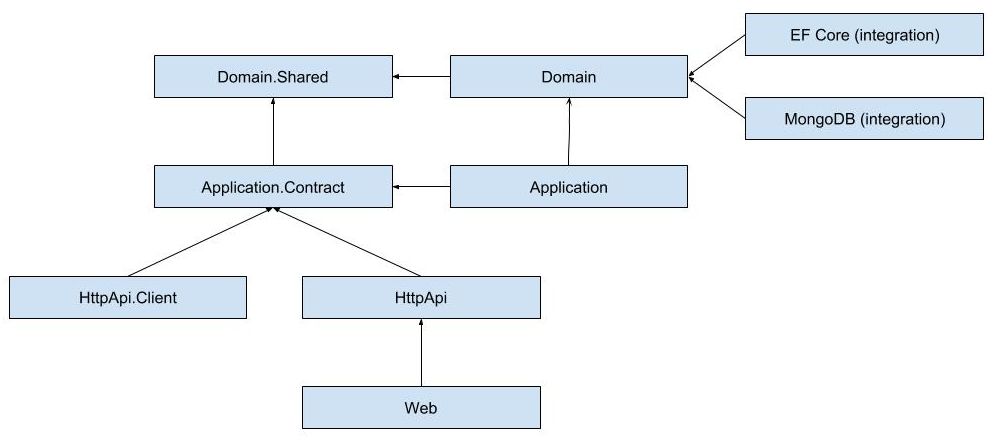
The ultimate goal is to allow an application to use the module in a flexible manner.
Deployment Scenarios
graph TB
    subgraph "Scenario A: Monolithic Application"
        A_App["Application"] --> A_Web["Web"]
        A_App --> A_AppPkg["Application"]
        A_App --> A_EF["EF Core / MongoDB"]
        A_Note["✅ Shows UI<br/>✅ Hosts App+Domain<br/>✅ Serves HTTP API"]
    end
graph TB
subgraph "Scenario B: Microservice (API Only)"
B_App["Microservice"] --> B_HttpApi["HttpApi"]
B_App --> B_AppPkg["Application"]
B_App --> B_EF["EF Core / MongoDB"]
B_Note["❌ No UI<br/>✅ Hosts App+Domain<br/>✅ Serves HTTP API"]
endgraph TB
subgraph "Scenario C: UI + Remote Service"
C_App["UI Application"] --> C_Web["Web"]
C_App --> C_Client["HttpApi.Client"]
C_Client -.->|"Remote Call"| C_Remote["Remote Service (A or B)"]
C_Note["✅ Shows UI<br/>❌ Remote App+Domain<br/>✅ Serves HTTP API"]
endgraph TB
subgraph "Scenario D: Client Application"
D_App["Client App"] --> D_Client["HttpApi.Client"]
D_Client -.->|"Remote Call"| D_Remote["Remote Service (A, B, or C)"]
D_Note["❌ No UI<br/>❌ Remote only<br/>❌ No HTTP API serving"]
endgraph TB
subgraph "Scenario E: API Proxy"
E_App["Proxy App"] --> E_HttpApi["HttpApi"]
E_App --> E_Client["HttpApi.Client"]
E_Client -.->|"Forward All"| E_Remote["Remote Service (A, B, or C)"]
E_Note["❌ No UI<br/>❌ Proxy only<br/>✅ Serves HTTP API (forwarded)"]
end| Scenario | Shows UI | Hosts App+Domain | Serves HTTP API | References |
|---|---|---|---|---|
| A) Monolithic | ✅ | ✅ (same process) | ✅ | Web, Application, EF Core/MongoDB |
| B) Microservice | ❌ | ✅ (same process) | ✅ | HttpApi, Application, EF Core/MongoDB |
| C) UI + Remote | ✅ | ❌ (remote service) | ✅ | Web, HttpApi.Client |
| D) Client | ❌ | ❌ (remote client) | ❌ | HttpApi.Client |
| E) API Proxy | ❌ | ❌ (proxy) | ✅ (forwarded) | HttpApi, HttpApi.Client |
Next section describes the packages in more details.
Domain Layer
- Do divide the domain layer into two projects:
- Domain.Shared package, named as GridLab.ModuleName.Domain.Shared, that contains constants, enums and other types those can be safely shared with the all layers of the module. This package can also be shared to 3rd-party clients. It can not contain entities, repositories, domain services or any other business objects.
- Domain package, named as GridLab.ModuleName.Domain, that contains entities, repository interfaces, domain service interfaces and their implementations and other domain objects.
- Domain package depends on the Domain.Shared package.
Application Layer
- Do divide the application layer into two projects:
- Application.Contracts package, named as GridLab.ModuleName.Application.Contracts, that contains application service interfaces and related data transfer objects.
- Application contract package depends on the Domain.Shared package.
- Application package, named as GridLab.ModuleName.Application, that contains application service implementations.
- Application package depends on the Domain and the Application.Contracts packages.
Infrastructure Layer
- Do create a separated integration package for each ORM/database integration like Entity Framework Core and MongoDB.
- Do, for instance, create a GridLab.ModuleName.EntityFrameworkCore package that abstracts the Entity Framework Core integration. ORM integration packages depend on the Domain package.
- Do not depend on other layers from the ORM/database integration package.
- Do create a separated integration package for each major library that is planned to be replaceable by another library without effecting the other packages.
HTTP Layer
- Do create an HTTP API package, named as GridLab.ModuleName.HttpApi, to develop a REST style HTTP API for the module.
- HTTP API package only depends on the Application.Contracts package. It does not depend on the Application package.
- Do create a Controller for each application service (generally by implementing their interfaces). These controllers uses the application service interfaces to delegate the actions. It just configures routes, HTTP methods and other web related stuffs if needed.
- Do create an HTTP API Client package, named as GridLab.ModuleName.HttpApi.Client, to provide client services for the HTTP API package. Those client services implement application interfaces as clients to a remote endpoint.
- HTTP API Client package only depends on the Application.Contracts package.
- Do use dynamic HTTP C# client proxy feature of the ABP framework.
Web Layer
- Do create a Web package, named as GridLab.ModuleName.Web, that contains pages, views, scripts, styles, images and other UI components.
- Web package only depends on the HttpApi package.
Dependencies of the Projects in the Solution
The diagram below shows the essential dependencies (project references) between the projects in the solution
graph BT
    DomainShared["Domain.Shared<br/><i>Constants, Enums, Shared Types</i>"]
    Domain["Domain<br/><i>Entities, Repositories, Services</i>"]
    AppContracts["Application.Contracts<br/><i>Service Interfaces, DTOs</i>"]
    Application["Application<br/><i>Service Implementations</i>"]
    EFCore["EntityFrameworkCore<br/><i>ORM, Mappings, Repositories</i>"]
    HttpApi["HttpApi<br/><i>Controllers, REST API</i>"]
    HttpApiClient["HttpApi.Client<br/><i>Remote Service Proxies</i>"]
    Web["Web<br/><i>Pages, Views, UI</i>"]

    Domain --> DomainShared
    AppContracts --> DomainShared
    Application --> AppContracts
    Application --> Domain
    EFCore --> Domain
    HttpApi --> AppContracts
    HttpApiClient --> AppContracts
    Web --> HttpApi
    Web -.->|"runtime"| Application
    Web -.->|"runtime"| EFCore
The dashed lines represent runtime dependencies explained in the Dashed Dependencies section below.
The projects have been explained before. Now, we can explain the reasons of the dependencies;
Domain.Sharedis the project that all other projects directly or indirectly depend on. So, all the types in this project are available to all projects.Domainonly depends on theDomain.Sharedbecause it is already a (shared) part of the domain. For example, anModelTypeenum in theDomain.Sharedcan be used by anModelentity in theDomainproject.Application.Contractsdepends on theDomain.Shared. In this way, you can reuse these types in the DTOs. For example, the sameModelTypeenum in theDomain.Sharedcan be used by aCreateModelDtoas a property.Applicationdepends on theApplication.Contractssince it implements the Application Service interfaces and uses the DTOs inside it. It also depends on theDomainsince the Application Services are implemented using the Domain Objects defined inside it.EntityFrameworkCoredepends on theDomainsince it maps the Domain Objects (entities and value types) to database tables (as it is an ORM) and implements the repository interfaces defined in theDomain.HttpApidepends on theApplication.Contactssince the Controllers inside it inject and use the Application Service interfaces as explained before.HttpApi.Clientdepends on theApplication.Contactssince it can consume the Application Services as explained before.Webdepends on theHttpApisince it serves the HTTP APIs defined inside it. Also, in this way, it indirectly depends on theApplication.Contactsproject to consume the Application Services in the Pages/Components.
Dashed Dependencies
When you investigate the solution, you will see two more dependencies shown with the dashed lines in the figure above. Web project depends on the Application and EntityFrameworkCore projects which theoretically should not be like that but actually it is.
This is because the Web is the final project that runs and hosts the application and the application needs the implementations of the Application Services and the Repositories while running.
This design decision potentially allows you to use Entities and EF Core objects in the Presentation Layer which should be strictly avoided. However, we find the alternative designs over complicated. Here, two of the alternatives if you want to remove this dependency;
- Convert
Webproject to a razor class library and create a new project, likeWeb.Host, that depends on theWeb,ApplicationandEntityFrameworkCoreprojects and hosts the application. You don't write any UI code here, but use only for hosting. - Remove
ApplicationandEntityFrameworkCoredependencies from theWebproject and load their assemblies on application initialization.