Module Project Root Customization
Overview
This guide covers customizing the root of an ABP module project, including solution cleanup, project files, NuGet packaging, CI/CD templates, localization, and .csproj configuration for each layer.
Configuration Areas
- Solution cleanup and project files
- CI/CD pipeline configuration
- NuGet packaging scripts
- .csproj configuration per layer
- Localization management
- .NET tools installation
Solution Structure
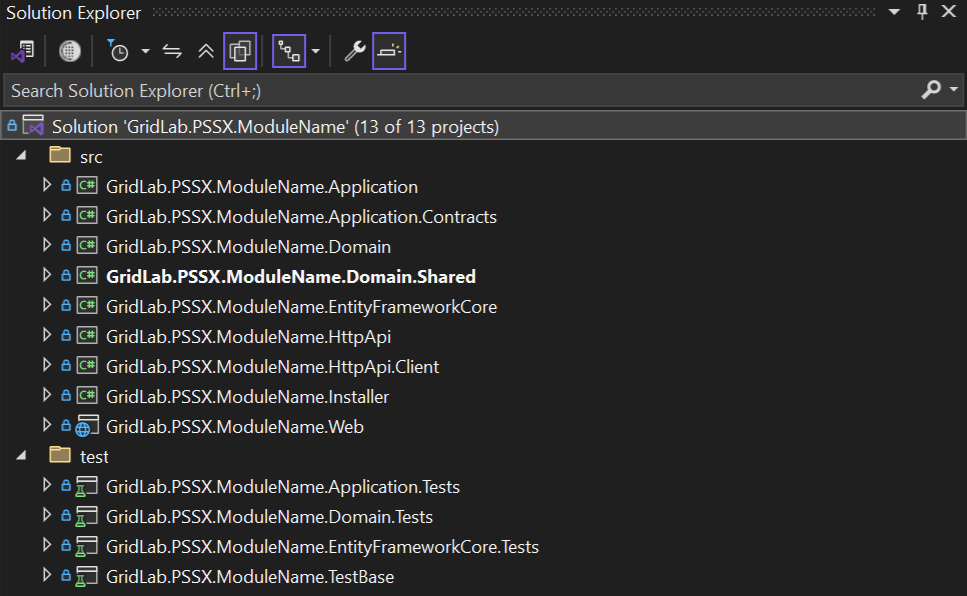
If you don't specify any options, you will have a solution like shown below:
Phase 1: Solution Cleanup
Step 1: Remove Unused Technologies
- Remove unused technologies from
.slnfile and coderepository.
💡 Tip: Move the
angularfolder from the solution directory to the respective user interface repository under user interfaces project group. Project names must be identical.
Step 2: Verify Project Root Files
- Ensure the following project-related files are available for reuse:
| File Name | Description |
|---|---|
.dockerignore | Files to be ignore when copying docker content. |
.editorconfig | File format and collection of text editor plugins for maintaining consistent coding styles between different editors and IDEs. |
.gitattributes | The .gitattributes file allows you to specify the files and paths attributes that should be used by git when performing git actions, such as git commit, etc. One of these attributes is the eol (end of line) and is used to configure the line endings for a file. |
.trivyignore | Vulnerability case number to be ignored when dockers are scanning. |
CHANGELOG.md | Changelog file. |
CONTRIBUTING.md | Guidelines for contributing to the project, including coding standards, commit message conventions, and the pull request process. |
common.props | MSBuild properties file used to define shared configuration settings, build properties, and variables that are commonly used across multiple projects in a solution. |
COPYING.md | Copyright file. |
delete-bin-obj-folders.ps1 | Script for cleaning bin and obj folders. |
install-libs.ps1 | Install NPM Packages for MVC / Razor Pages and Blazor Server UI types. |
LICENSE.md | Software license file. |
NuGet.Config | Nuget configuration for gitlab artifactory. |
README.md | ReadMe file. |
renovate.json5 | Renovate bot configuration for project. |
sonarqube-analysis.xml | This file is used to configure and provide details about the code analysis that SonarQube will perform on your project. |
common.props | Contains .csproj settings valid for all layers. |
VERSION | Release tag tracker, required for release-it git lab template. |
Step 3: Update CI/CD Pipeline
- Update basic GitLab CI template:
| File Name | Description |
|---|---|
.gitlab-ci.yml | Base ci/cd pipeline for gitlab projects. |
Step 4: Update NuGet Packaging Scripts
- Update module name in NuGet package creation scripts:
| File Name | Description |
|---|---|
nupkg\common.ps1 | Update |
....
# List of projects
$projects = (
    # project packages
    "src/GridLab.Gmss.<ModuleName>.Application",
    "src/GridLab.Gmss.<ModuleName>.Application.Contracts",
    "src/GridLab.Gmss.<ModuleName>.Domain",
    "src/GridLab.Gmss.<ModuleName>.Domain.Shared",
    "src/GridLab.Gmss.<ModuleName>.EntityFrameworkCore",
    "src/GridLab.Gmss.<ModuleName>.HttpApi",
    "src/GridLab.Gmss.<ModuleName>.HttpApi.Client",
  # "src/GridLab.Gmss.<ModuleName>.MongoDB",
    "src/GridLab.Gmss.<ModuleName>.Web"
)
...
Phase 2: Layer Configuration
Step 1: Configure .csproj for Each Layer
- Update configuration of the
.csprojfor each layer:
src:
- GridLab.Gmss.<ModuleName>.Application
- GridLab.Gmss.<ModuleName>.Application.Contracts
- GridLab.Gmss.<ModuleName>.Domain
- GridLab.Gmss.<ModuleName>.Domain.Shared
- GridLab.Gmss.<ModuleName>.EntityFrameworkCore
- GridLab.Gmss.<ModuleName>.HttpApi
- GridLab.Gmss.<ModuleName>.HttpApi.Client
- GridLab.Gmss.<ModuleName>.MongoDB
- GridLab.Gmss.<ModuleName>.Web
Set TargetFramework latest available framework version. In this example we used .net9 Use TargetFrameworks if multi-targeting is required.
  <PropertyGroup>
    <TargetFramework>net9.0</TargetFramework>
  </PropertyGroup>
  <PropertyGroup>
    <TargetFrameworks>net8.0;net9.0</TargetFramework>
  </PropertyGroup>
Modify Description property according to each layer
Description:
- GridLab.Gmss.<ModuleName>.Application:
  <PropertyGroup>
    <Description>Mediates between the presentation and domain Layers. Orchestrates business objects to perform specific application tasks. Implements use cases as the application logic for the module</Description>
  </PropertyGroup>
- GridLab.Gmss.<ModuleName>.Application.Contracts:
  <PropertyGroup>
    <Description>Contains the module application service interfaces and the DTOs used by these interfaces</Description>
  </PropertyGroup>
- GridLab.Gmss.<ModuleName>.Domain:
  <PropertyGroup>
    <Description>Module business objects and the core (domain) business rules. This is the heart of the application</Description>
  </PropertyGroup>
- GridLab.Gmss.<ModuleName>.Domain.Shared:
  <PropertyGroup>
    <Description>Thin module layer that contains some types those belong to the Domain Layer, but shared with all other layers</Description>
  </PropertyGroup>
- GridLab.Gmss.<ModuleName>.EntityFrameworkCore:
  <PropertyGroup>
    <Description>Essential integration package for the EF Core. Application's DbContext, database mappings, implementations of the repositories and other EF Core related stuffs</Description>
  </PropertyGroup>
- GridLab.Gmss.<ModuleName>.HttpApi:
  <PropertyGroup>
    <Description>Contains HTTP APIs defined by the module</Description>
  </PropertyGroup>
- GridLab.Gmss.<ModuleName>.HttpApi.Client:
  <PropertyGroup>
    <Description>Useful when you have a C# application that needs to consume your HTTP APIs. Once the client application references this project, it can directly inject and use the Application Services</Description>
  </PropertyGroup>
- GridLab.Gmss.<ModuleName>.Installer:
  <PropertyGroup>
    <Description>Automates the installation of required dependencies and configures necessary modules</Description>
  </PropertyGroup>
- GridLab.Gmss.<ModuleName>.MongoDB:
  <PropertyGroup>
    <Description>Essential integration package for the MongoDB</Description>
  </PropertyGroup>
- GridLab.Gmss.<ModuleName>.Web:
  <PropertyGroup>
    <Description> ASP.NET Core MVC / Razor Pages application module. This is the only executable application that serves the application and the APIs</Description>
  </PropertyGroup>
Create software documentation for GridLab.Gmss.<ModuleName>.HttpApi layer to be used in Swagger interface.
  <PropertyGroup Condition="'$(Configuration)|$(Platform)'=='Debug|AnyCPU'">
    <DocumentationFile>GridLab.Gmss.<ModuleName>.HttpApi.xml</DocumentationFile>
  </PropertyGroup>

  <PropertyGroup Condition="'$(Configuration)|$(Platform)'=='Release|AnyCPU'">
    <DocumentationFile>GridLab.Gmss.<ModuleName>.HttpApi.xml</DocumentationFile>
  </PropertyGroup>
Phase 3: Development Tools
Step 1: Install Local .NET Tools
- Install
dotnet toolslocally (not globally) for reproducible builds.
A .NET tool is a special NuGet package that contains a console application. You can install a tool on your machine as a local tool. See more under .NET Tool
The .NET CLI uses manifest files to keep track of tools that are installed as local to a directory. When the manifest file is saved in the root directory of a source code repository, a contributor can clone the repository and invoke a single .NET CLI command to install all of the tools listed in the manifest file.
dotnet tool install volo.abp.studio.cli --version X.Y.Z
dotnet tool install dotnet-ef --version X.Y.Z
Replace version number with latest available.
This creates a dotnet-tools.json file under the .config folder.
Step 2: Trim Unused Localizations
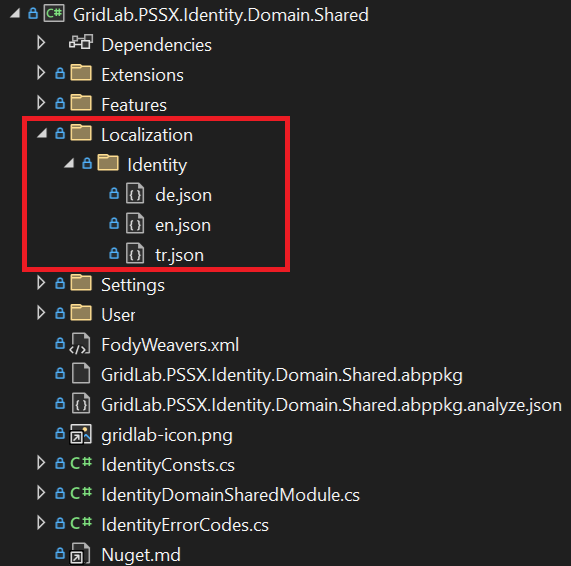
- Delete unused localizations at <ModuleName>DomainSharedModule, keep only
en,tr, anddelanguages.
Phase 4: Fix Common Issues
Step 1: Fix EntityFrameworkCore.Tests Bug
- If there is a bug in the
.EntityFrameworkCore.Testsproject, fix it as follows:
Configure<AbpDbContextOptions>(options =>
{
    options.Configure(configurationContext =>
    {
        configurationContext.DbContextOptions.UseSqlite(sqliteConnection);
    });
});
Step 2: Reduce EF Core Log Verbosity
- EF Core is very chatty by default. Add the minimum level override for
Microsoft.EntityFrameworkCore:
        Log.Logger = new LoggerConfiguration()
#if DEBUG
            .MinimumLevel.Debug()
#else
            .MinimumLevel.Information()
#endif
            .MinimumLevel.Override("Microsoft", LogEventLevel.Information)
            .MinimumLevel.Override("Microsoft.EntityFrameworkCore", LogEventLevel.Warning)
            .Enrich.FromLogContext()
            .WriteTo.Async(c => c.File("Logs/logs.txt"))
#if DEBUG
            .WriteTo.Async(c => c.Console())
#endif
            .CreateLogger();
Step 3: Remove Nullable Usage
- Remove
nullableusage from.csprojfiles (if not needed):
  <PropertyGroup>
    <Nullable>enable</Nullable>
  </PropertyGroup>